



A 3-day trial isn’t enough time to test anything. You install, set things up, wait for the promotion date to arrive — and by the time it does, the trial is over.
That’s why agendabee changed. The trial with an expiration date is gone. In its place: Bee Free, a permanent free plan with no credit card required.
And since you’ll be testing at your own pace, it’s worth knowing the two steps that save the most time — and margin — when you build a promotion.
The problem: prices changed by hand and cents worked out in your head#
Almost every store promotion goes through the same ritual:
- Open product after product to change the price.
- Apply a 25% discount on the calculator and land on R$ 1,846.43.
- Decide on the spot whether to round to R$ 1,846.90, R$ 1,846.99, or leave it.
- Repeat across 40, 80, 200 products — and hope you don’t get any of them wrong.
The result is a storefront full of odd prices, a few off-pattern ones here and there, and hours that could have gone somewhere else.
With agendabee, you select the products, set the discount, and standardize the cents on all of them at once — then the bees apply everything at the scheduled time.
The flow always follows this order: first product selection, then cents rounding.
Part 1 of the flow: Smart Product Selection#
Before touching prices, you decide which products are in the promotion. When you reach the “select the products” step, agendabee asks how you want to make that selection:
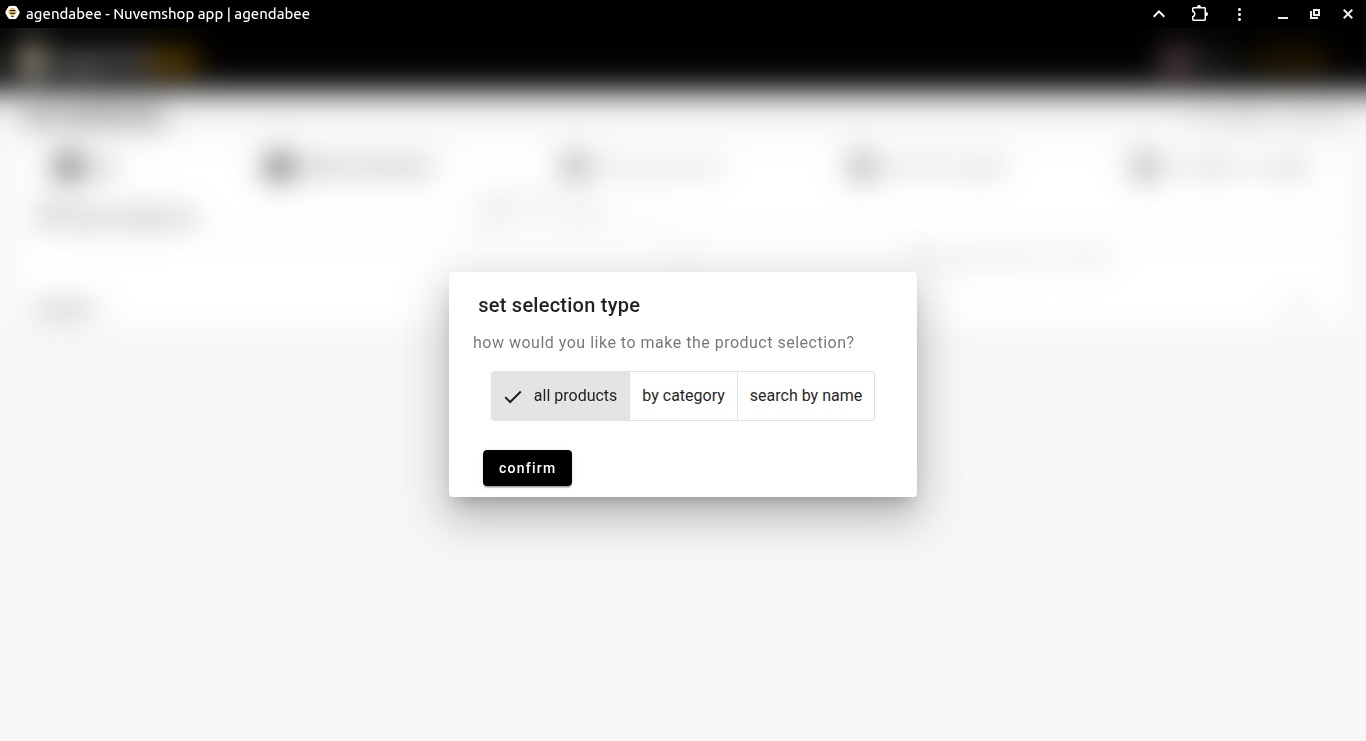
All products#
Lists your entire catalog, paginated, and lets you select every product in the store at once. Ideal for store-wide campaigns, like a Black Friday with a discount on everything.
By category#
You pick a category from your store and agendabee shows only its products. Ideal for niche promotions: just the winter collection, just accessories, just new arrivals.
Search by name#
You type the name, the product shows up filtered, and you select it. Add as many as you want. This is the surgical mode: that item sitting in stock, the best-seller that will pull the campaign.
Three modes, one rule: you only change the prices of the products you chose — the rest of the store stays untouched.
Part 2 of the flow: Standard Cents Rounding#
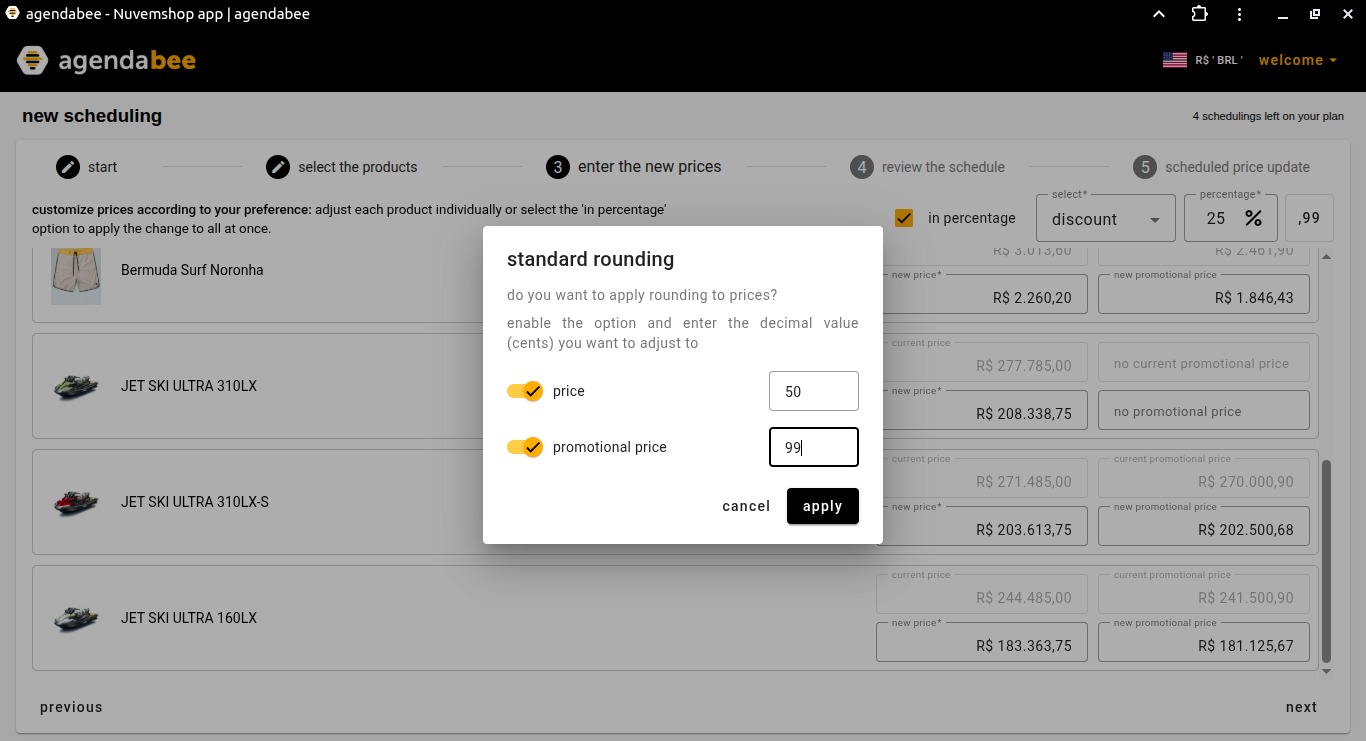
With your products selected, you set a percentage discount (or increase) for all of them at once. This is where the second differentiator comes in: the standard rounding window.
How it works#
The window asks: do you want to apply rounding to prices? You turn the option on and enter the cents value you want to adjust to. And you do it independently for each price type:
- Price (the regular price): for example, ending in .90.
- Promotional price: for example, ending in .99.
Click “apply” and every selected product gets the same ending. In practice: the 25% discount produced a promotional price of R$ 1,846.43; with rounding set to .99, it becomes R$ 1,846.99.
Why it matters for your margin and your storefront#
- Only the cents change. The whole-number part stays exactly as the discount calculated it — no accidental extra discount.
- A consistent storefront. Prices ending in .90 or .99 are the retail standard. A storefront with R$ 1,846.43 next to R$ 203,613.75 looks rushed; one ending in .99 throughout looks planned.
- Different endings for regular and promotional prices. Keep the “was” price ending in .90 and the “now” price in .99, and shoppers read both clearly.
- Zero mental math. No calculator, no product-by-product edits.
Percentage discount plus standardized cents: your promotion looks sharp on the storefront without breaking your margin.
After that, you review the summary, save, and relax. The bees apply the new prices at the scheduled time and, if you set up a reversal, restore the original prices on their own.
agendabee’s new plan model#
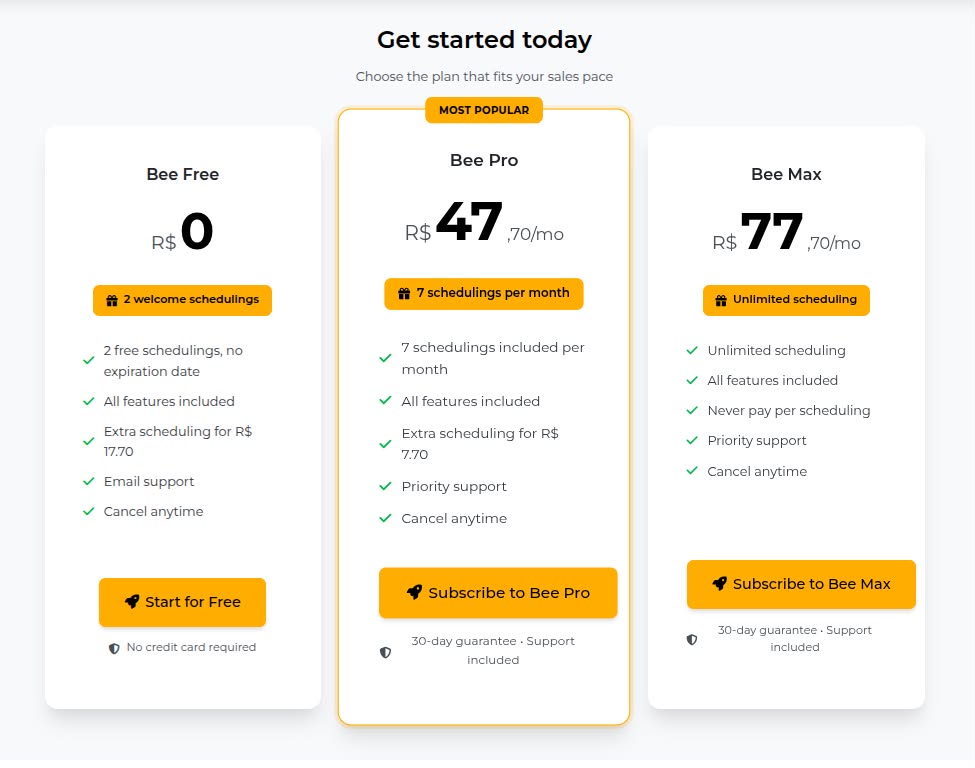
Before the table, the rule that explains everything: each scheduling is one event. Activating the promotion is 1 scheduling. Reverting prices back to normal is another. A complete promotion, with automatic start and end, uses 2 schedulings.
| Bee Free | Bee Pro | Bee Max | |
|---|---|---|---|
| Price | R$ 0 | R$ 47.70/month | R$ 77.70/month |
| Included schedulings | 2 welcome schedulings (never expire) + 1 per month starting in month 2 | 7 per month | Unlimited |
| Extra single scheduling | R$ 17.70 | R$ 7.70 | None — you never pay extra |
| Features | All included | All included | All included |
| Priority support | — | ✓ | ✓ |
| 30-day guarantee | — | ✓ | ✓ |
Bee Free: the 2 welcome schedulings#
The 2 welcome schedulings aren’t a random number. They cover exactly one full campaign cycle: one to activate the promotion and one to revert the prices. You test the product for real, start to finish, without spending anything.
And they never expire. Use them tomorrow, on the next holiday, or save them for Black Friday. Starting in month 2, you get 1 more free scheduling per month — it renews every 30 days and doesn’t roll over. Need more? Buy an extra scheduling for R$ 17.70.
Bee Pro: for stores that run promotions every month#
7 schedulings a month cover 3 complete promotions with reversal, with 1 to spare. Need more? An extra scheduling costs R$ 7.70 — less than half the Bee Free price.
Bee Max: for stores that don’t want to count#
Unlimited schedulings. You never pay for an extra scheduling, no matter how many campaigns you run in a month.
Secure payment, from any country#
Prices are in Brazilian reais (R$) and payments are processed by Stripe, the payment platform used by businesses worldwide. If you pay in another currency, Stripe converts it automatically at the time of the charge. No commitment: switch or cancel your plan anytime.
Create your free account and build your first promotion today#
No credit card needed, no clock running, and full access to every feature — including smart product selection and standard cents rounding.
Set it up once. The bees do the rest.
Create my free Bee Free account →